 61dd2e30c3
* Add configuration option to disable subagent notifications - Added 'enableSubagentNotifications' config option (default: false) - Modified notification handler to check config before sending subagent notifications - Created documentation explaining the feature - Updated README with note about subagent notifications This addresses the issue where frequent subagent notifications can be distracting. Users can now control whether they receive notifications when subagents stop/start. 🤖 Generated with [Claude Code](https://claude.ai/code) Co-Authored-By: Claude <noreply@anthropic.com> * Add subagent activity tracking in completion emails - Track subagent activities instead of sending individual notifications - Include subagent activity summary in completion emails - Update email templates to display subagent activities - Add SubagentTracker utility to manage activity tracking - Update documentation to explain the new behavior This provides a better user experience by: 1. Reducing notification noise from frequent subagent activities 2. Still providing full visibility into what subagents did 3. Consolidating all information in the completion email 🤖 Generated with [Claude Code](https://claude.ai/code) Co-Authored-By: Claude <noreply@anthropic.com> * Improve subagent activity details and documentation - Enhanced activity capture to include up to 1000 characters (was 200) - Improved email display format with better visual separation - Added detection for initialization-only captures with helpful message - Added configuration option for activity detail level - Created comprehensive documentation explaining the timing limitation - Added visual indicators for processing status This addresses the issue where subagent outputs were truncated or only showed initialization messages. Users now get better visibility into what subagents are doing, with clear indication when full output is available in tmux. 🤖 Generated with [Claude Code](https://claude.ai/code) Co-Authored-By: Claude <noreply@anthropic.com> * delete redundant files and modify README * Fix HTML escaping in email notifications - Add _escapeHtml function to properly escape HTML entities in emails - Escape user-generated content to prevent HTML tags from being hidden - Fix issue where <developer> and other HTML-like strings disappeared in emails - Apply escaping to both main email content and subagent activity summaries 🤖 Generated with [Claude Code](https://claude.ai/code) Co-Authored-By: Claude <noreply@anthropic.com> * Add full execution trace to email notifications - Add getFullExecutionTrace method to capture complete terminal output - Include execution trace in a scrollable section within emails - Add CSS styling for visible scrollbars on desktop - Clean trace output by removing command prompt boxes - Add fallback message when trace is not available This addresses issue #11 - providing transparency about task execution 🤖 Generated with [Claude Code](https://claude.ai/code) Co-Authored-By: Claude <noreply@anthropic.com> * Redesign email notification UI with improved terminal aesthetics - Reorganize content hierarchy: user request at top, response second, trace at bottom - Preserve terminal-style commands ($ cat, $ claude-code execute, etc.) - Remove redundant session info footer - Implement smart execution trace capture from user input to completion - Add TraceCapture utility to track user input timestamps - Improve visual hierarchy while maintaining terminal aesthetics - Use border colors (orange for user, green for success) for better distinction - Make execution trace collapsible and de-emphasized This improves readability while preserving the terminal charm of the project. 🤖 Generated with [Claude Code](https://claude.ai/code) Co-Authored-By: Claude <noreply@anthropic.com> * Fix execution trace filtering to show only recent activity - Change filter logic to find LAST user input instead of first - Search backwards through content to find most recent "> " prompt - Only include content from that point forward - Add fallback to show last 100 lines if no user input found - This ensures trace shows only relevant recent execution, not entire history 🤖 Generated with [Claude Code](https://claude.ai/code) Co-Authored-By: Claude <noreply@anthropic.com> * Remove duplicate content from execution trace - Skip the first user input line (already shown in main content) - Skip the last Claude response (already shown in main content) - Only show intermediate execution steps and tool usage - Clean up empty lines at beginning and end - This avoids redundancy and focuses trace on execution details 🤖 Generated with [Claude Code](https://claude.ai/code) Co-Authored-By: Claude <noreply@anthropic.com> * Fix execution trace to properly remove complete user input and output - Track multi-line user input and skip all continuation lines - Detect when user input ends (empty line or next command) - Stop before the last Claude response to avoid truncation - Only show intermediate execution steps between input and output This ensures the trace shows the complete execution process without duplicating content already displayed in the main sections. 🤖 Generated with [Claude Code](https://claude.ai/code) Co-Authored-By: Claude <noreply@anthropic.com> * Fix multi-line user input capture and trace filtering - Capture complete multi-line user input (not just first line) - Join continuation lines with spaces for proper display - Preserve all execution details in trace (tool calls, outputs) - Only skip user input and final response, keep everything in between * Add configuration toggle for subagent activities in email - Added 'showSubagentActivitiesInEmail' config option (default: false) - Modified claude-remote.js to check config before including subagent activities - Created documentation explaining the configuration - Allows users to choose between concise emails (execution trace only) or detailed emails (both summaries) This addresses the redundancy between execution trace and subagent activities summary, giving users control over email content. 🤖 Generated with [Claude Code](https://claude.ai/code) Co-Authored-By: Claude <noreply@anthropic.com> * Fix Git merge conflict in email template and document subagent config - Removed Git merge conflict markers from email text template - Added documentation for showSubagentActivitiesInEmail config in README - Explained that subagent activities are disabled by default for concise emails 🤖 Generated with [Claude Code](https://claude.ai/code) Co-Authored-By: Claude <noreply@anthropic.com> * Update README changelog for PR #10 and issue #11 - Added entry for subagent notifications configuration (PR #10) - Added entry for execution trace feature (issue #11) - Maintained chronological order in changelog 🤖 Generated with [Claude Code](https://claude.ai/code) Co-Authored-By: Claude <noreply@anthropic.com> * delete redundant files * fix #15: add local database into .gitignore * Fix execution trace display in email notifications - Remove collapsible details tag for better email client compatibility - Add configuration option to toggle execution trace display - Fix HTML escaping issue for executionTraceSection variable 🤖 Generated with [Claude Code](https://claude.ai/code) Co-Authored-By: Claude <noreply@anthropic.com> * Remove data files from git tracking These session-specific data files should not be tracked in version control as they are machine-specific and cause issues when pulling on other machines. 🤖 Generated with [Claude Code](https://claude.ai/code) Co-Authored-By: Claude <noreply@anthropic.com> * fix typo(?) in changelog (#13) --------- Co-authored-by: Claude <noreply@anthropic.com> Co-authored-by: Naich <an.naich@gmail.com> Co-authored-by: JessyTsui <51992423+JessyTsui@users.noreply.github.com> |
||
|---|---|---|
| assets | ||
| config | ||
| src | ||
| .env.example | ||
| .gitignore | ||
| LICENSE | ||
| README.md | ||
| claude-control.js | ||
| claude-remote.js | ||
| install-global.js | ||
| package-lock.json | ||
| package.json | ||
| send-test-reply.js | ||
| start-relay-pty.js | ||
| taskping-config.js | ||
| test-long-email.js | ||
README.md
Claude Code Remote
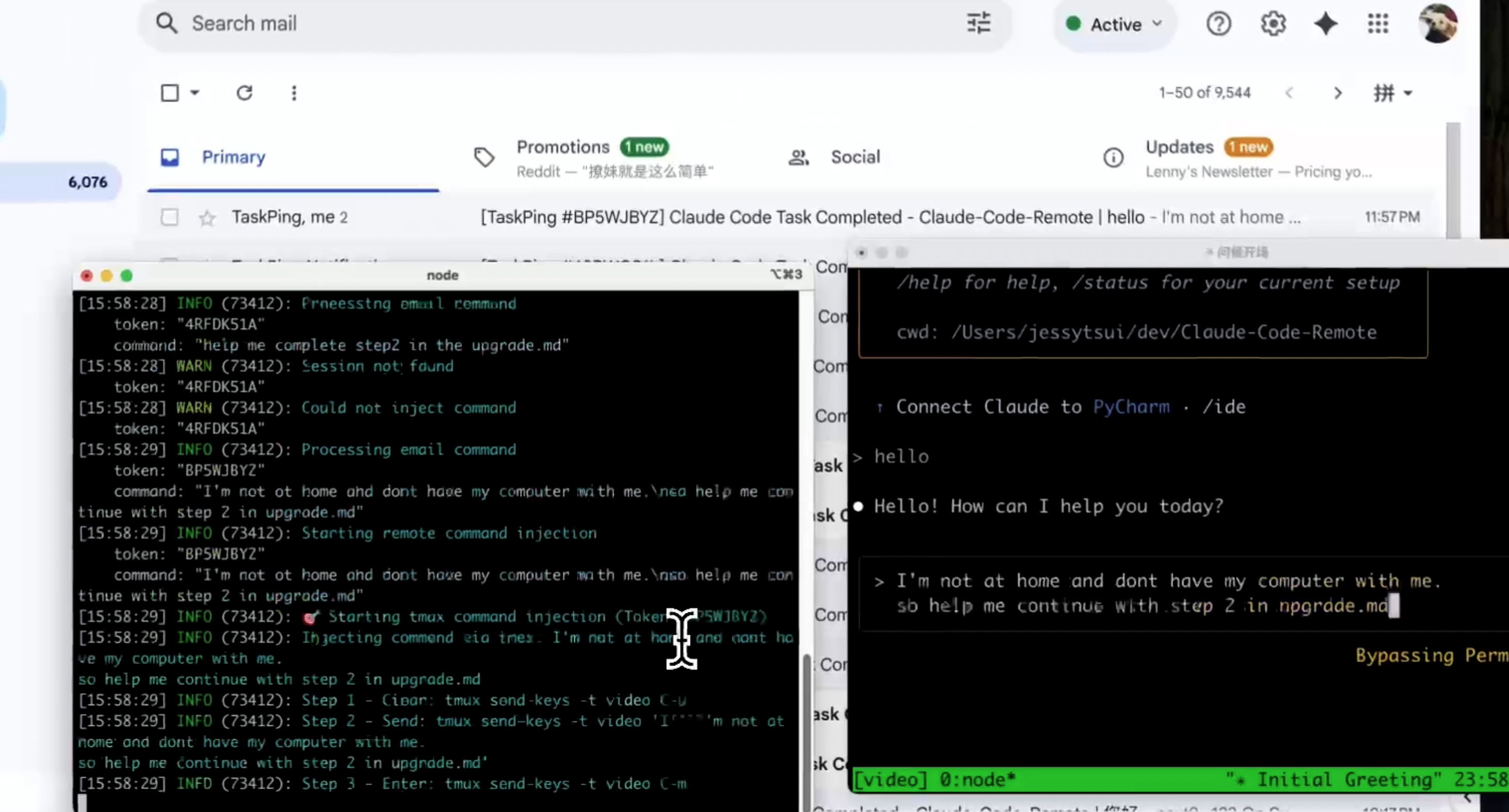
Control Claude Code remotely via email. Start tasks locally, receive notifications when Claude completes them, and send new commands by simply replying to emails.
🎥 Watch Demo Video

🐦 Follow @Jiaxi_Cui for updates and AI development insights
✨ Features
- 📧 Email Notifications: Get notified when Claude completes tasks
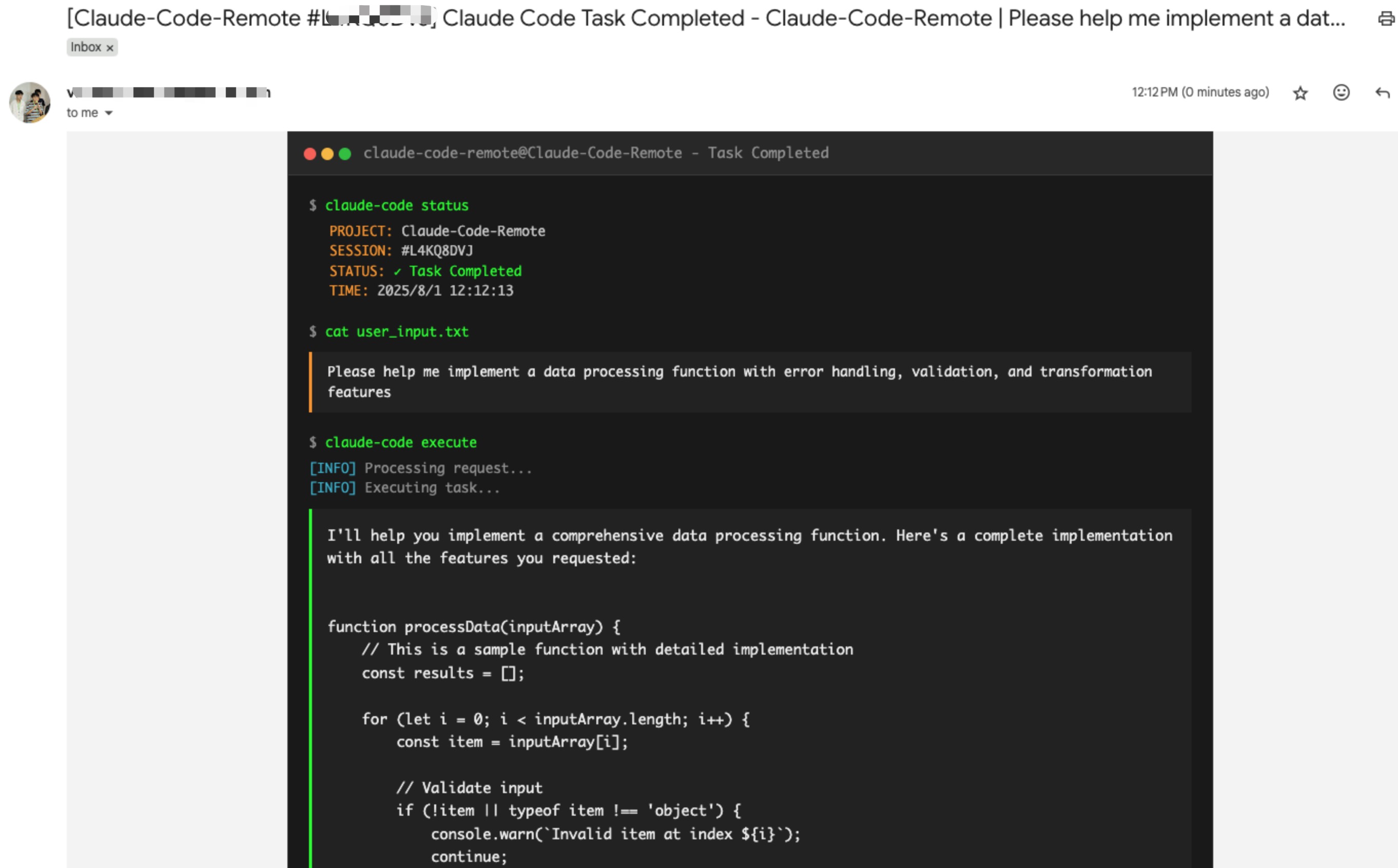
- 🔄 Email Control: Reply to emails to send new commands to Claude
- 📱 Remote Access: Control Claude from anywhere with just email
- 🔒 Secure: Whitelist-based sender verification
- 📋 Multi-line Support: Send complex commands with formatting
📅 Changelog
August 2025
- 2025-08-01: Implement terminal-style UI for email notifications (#8 by @vaclisinc)
- 2025-08-01: Fix working directory issue - enable claude-remote to run from any directory (#7 by @vaclisinc)
July 2025
- 2025-07-31: Fix self-reply loop issue when using same email for send/receive (#4 by @vaclisinc)
- 2025-07-28: Remove hardcoded values and implement environment-based configuration (#2 by @kevinsslin)
📋 TODO List
Notification Channels
- Discord & Telegram: Bot integration for messaging platforms
- Slack Workflow: Native Slack app with slash commands
Developer Tools
- AI Tools: Support for Gemini CLI, Cursor, and other AI tools
- Git Automation: Auto-commit, PR creation, branch management
Usage Analytics
- Cost Tracking: Token usage and estimated costs
- Performance Metrics: Execution time and resource usage
- Scheduled Reports: Daily/weekly usage summaries via email
Native Apps
- Mobile Apps: iOS and Android applications
- Desktop Apps: macOS and Windows native clients
🚀 Setup Guide
Follow these steps to get Claude Code Remote running:
Step 1: Clone and Install Dependencies
git clone https://github.com/JessyTsui/Claude-Code-Remote.git
cd Claude-Code-Remote
npm install
Step 2: Configure Email Settings
# Copy the example configuration
cp .env.example .env

# Open .env in your editor
nano .env  # or use vim, code, etc.
Edit the .env file with your email credentials:
# Email account for sending notifications
SMTP_USER=your-email@gmail.com
SMTP_PASS=your-app-password    # Gmail: use App Password, not regular password

# Email account for receiving replies (can be same as SMTP)
IMAP_USER=your-email@gmail.com
IMAP_PASS=your-app-password

# Where to send notifications
EMAIL_TO=your-notification-email@gmail.com

# Who can send commands (security whitelist)
ALLOWED_SENDERS=your-notification-email@gmail.com

# Path to session data (use absolute path)
SESSION_MAP_PATH=/your/absolute/path/to/Claude-Code-Remote/src/data/session-map.json
📌 Gmail users: Create an App Password instead of using your regular password.
Note: You may need to enable two-step verification in your google account first before create app password.
Step 3: Set Up Claude Code Hooks
Open Claude's settings file:
# Create the directory if it doesn't exist
mkdir -p ~/.claude

# Edit settings.json
nano ~/.claude/settings.json
Add this configuration (replace /your/absolute/path/ with your actual path):
{
  "hooks": {
    "Stop": [{
      "matcher": "*",
      "hooks": [{
        "type": "command",
        "command": "node /your/absolute/path/to/Claude-Code-Remote/claude-remote.js notify --type completed",
        "timeout": 5
      }]
    }],
    "SubagentStop": [{
      "matcher": "*",
      "hooks": [{
        "type": "command",
        "command": "node /your/absolute/path/to/Claude-Code-Remote/claude-remote.js notify --type waiting",
        "timeout": 5
      }]
    }]
  }
}
Note: Subagent notifications are disabled by default. To enable them, set
enableSubagentNotifications: truein your config. See Subagent Notifications Guide for details.
Step 4: Test Your Setup
# Test email configuration
node claude-remote.js test
You should receive a test email. If not, check your email settings.
Step 5: Start Claude Code Remote
Terminal 1 - Start email monitoring:
npm run relay:pty
Keep this running. You should see:
🚀 Claude Code Remote is running!
📧 Monitoring emails...
Terminal 2 - Start Claude in tmux:
# Create a new tmux session
tmux new-session -s my-project

# Inside tmux, start Claude
claude
Step 6: You're Ready!
- Use Claude normally in the tmux session
- When Claude completes a task, you'll receive an email
- Reply to the email with new commands
- Your commands will execute automatically in Claude
Verify Everything Works
In Claude, type:
What is 2+2?
Wait for Claude to respond, then check your email. You should receive a notification!
📖 How to Use
Email Notifications
When Claude completes a task, you'll receive an email notification:
Subject: Claude Code Remote Task Complete [#ABC123]

Claude completed: "analyze the code structure"

[Claude's full response here...]

Reply to this email to send new commands.
Sending Commands via Email Reply
- Direct Reply: Simply reply to the notification email
- Write Command: Type your command in the email body:
Please refactor the main function and add error handling - Send: Your command will automatically execute in Claude!
Advanced Email Features
Multi-line Commands
First analyze the current code structure.
Then create a comprehensive test suite.
Finally, update the documentation.
Complex Instructions
Refactor the authentication module with these requirements:
- Use JWT tokens instead of sessions
- Add rate limiting
- Implement refresh token logic
- Update all related tests
Email Reply Workflow
- Receive Notification → You get an email when Claude completes a task
- Reply with Command → Send your next instruction via email reply
- Automatic Execution → The system extracts your command and injects it into Claude
- Get Results → Receive another email when the new task completes
Supported Email Clients
Works with any email client that supports standard reply functionality:
- ✅ Gmail (Web/Mobile)
- ✅ Apple Mail
- ✅ Outlook
- ✅ Any SMTP-compatible email client
Advanced Configuration
Email Notification Options
-
Subagent Activities in Email
By default, email notifications only show the execution trace. You can optionally enable a separate subagent activities summary section:
// In your config/config.json
{
  "showSubagentActivitiesInEmail": true  // Default: false
}
When enabled, emails will include:
- Subagent Activities Summary: A structured list of all subagent activities
- Full Execution Trace: The complete terminal output
Since the execution trace already contains all information, this feature is disabled by default to keep emails concise.
-
Execution Trace Display
You can control whether to include the execution trace in email notifications:
// In your email channel configuration { "email": { "config": { "includeExecutionTrace": false // Default: true } } }- When
true(default): Shows a scrollable execution trace section in emails - When
false: Removes the execution trace section entirely from emails
This is useful if you find the execution trace too verbose or if your email client has issues with scrollable content.
- When
💡 Common Use Cases
- Remote Development: Start coding at the office, continue from home via email
- Long Tasks: Let Claude work while you're in meetings, check results via email
- Team Collaboration: Share Claude sessions by forwarding notification emails
🔧 Useful Commands
# Test email setup
node claude-remote.js test

# Check system status
node claude-remote.js status

# View tmux sessions
tmux list-sessions
tmux attach -t my-project

# Stop email monitoring
# Press Ctrl+C in the terminal running npm run relay:pty
🔍 Troubleshooting
Not receiving emails?
- Run
node claude-remote.js testto test email setup - Check spam folder
- Verify SMTP settings in
.env - For Gmail: ensure you're using App Password
Commands not executing?
- Ensure tmux session is running:
tmux list-sessions - Check sender email matches
ALLOWED_SENDERSin.env - Verify Claude is running inside tmux
Need help?
- Check Issues
- Follow @Jiaxi_Cui for updates
🛡️ Security
- ✅ Sender Whitelist: Only authorized emails can send commands
- ✅ Session Isolation: Each token controls only its specific session
- ✅ Auto Expiration: Sessions timeout automatically
🤝 Contributing
Found a bug or have a feature request?
- 🐛 Issues: GitHub Issues
- 🐦 Updates: Follow @Jiaxi_Cui on Twitter
- 💬 Discussions: Share your use cases and improvements
📄 License
MIT License - Feel free to use and modify!
🚀 Make Claude Code truly remote and accessible from anywhere!
⭐ Star History
⭐ Star this repo if it helps you code more efficiently!
💡 Tip: Share your remote coding setup on Twitter and tag @Jiaxi_Cui - we love seeing how developers use Claude Code Remote!