 0eb01e6e75
* Fix self-reply loop issue when using same email for send/receive - Add Message-ID tracking to prevent processing system-sent emails - Track sent emails in sent-messages.json with auto-cleanup - Skip system emails in both email-listener.js and relay-pty.js - Extract session from token/headers/body for proper reply routing - Reduce verbose logging in tmux-injector to debug level Fixes #3 🤖 Generated with [Claude Code](https://claude.ai/code) Co-Authored-By: Claude <noreply@anthropic.com> * Fix working directory issue - enable claude-remote to run from any directory - Use absolute path to load .env file instead of relying on current working directory - Fix environment variable loading in both main program and relay service - Now claude-remote can be executed from any directory Fixes #5 * Fix issue #6: Implement terminal-style UI for email notifications - Redesigned email template with terminal/console aesthetic - Used monospace fonts and dark theme for tech look - Fixed Claude response truncation issue (removed 500 char limit) - Increased tmux buffer capture from 50 to 200 lines - Preserved code formatting (removed space collapsing) - Added terminal-style command prompts and colored output - Created test script for long content validation * Fix terminal UI visual issues - Fixed traffic light buttons spacing (now properly separated) - Changed background from pure black to lighter gray (#f5f5f5) - Terminal content background changed to softer dark (#1a1a1a) - Code blocks background changed to #262626 for better contrast - Improved overall visual hierarchy and readability * Fine-tune traffic light button spacing - Adjusted spacing between buttons from 8px to 6px - Reduced gap after buttons from 20px to 12px - Achieved more natural macOS-like appearance * Use table layout for better email client compatibility - Changed from inline-flex to table layout for traffic light buttons - Set explicit 5px spacing between buttons using table cells - This ensures consistent rendering across different email clients --------- Co-authored-by: Claude <noreply@anthropic.com> |
||
|---|---|---|
| config | ||
| src | ||
| .env.example | ||
| .gitignore | ||
| CCRemote_demo.png | ||
| HOW_TO_USE_EMAIL_REPLY.md | ||
| HOW_TO_USE_EMAIL_REPLY_ZH.md | ||
| LICENSE | ||
| README.md | ||
| claude-control.js | ||
| claude-remote.js | ||
| install-global.js | ||
| package-lock.json | ||
| package.json | ||
| send-test-reply.js | ||
| start-relay-pty.js | ||
| taskping-config.js | ||
| test-long-email.js | ||

README.md
Claude Code Remote
Control Claude Code remotely via email. Start tasks locally, receive notifications when Claude completes them, and send new commands by simply replying to emails.
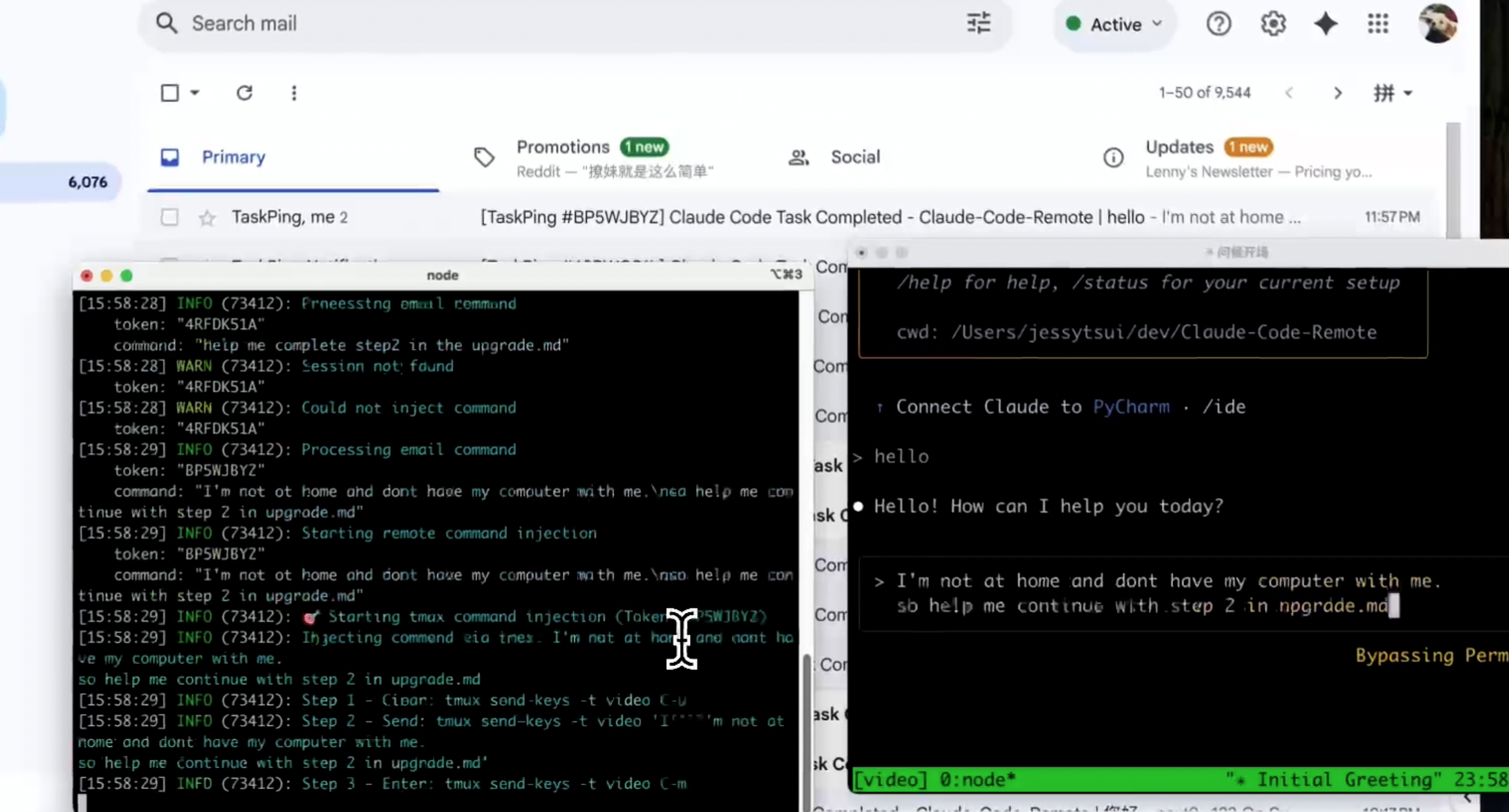
🎥 Watch Demo Video

🐦 Follow @Jiaxi_Cui for updates and AI development insights
✨ Features
- 📧 Email Notifications: Get notified when Claude completes tasks
- 🔄 Email Control: Reply to emails to send new commands to Claude
- 📱 Remote Access: Control Claude from anywhere with just email
- 🔒 Secure: Whitelist-based sender verification
- 📋 Multi-line Support: Send complex commands with formatting
🚀 Quick Start
1. Install
git clone https://github.com/JessyTsui/Claude-Code-Remote.git
cd Claude-Code-Remote
npm install
2. Configure Email
# Copy example config
cp .env.example .env

# Edit with your email credentials
nano .env
Required settings:
SMTP_USER=your-email@gmail.com
SMTP_PASS=your-app-password
IMAP_USER=your-email@gmail.com
IMAP_PASS=your-app-password
EMAIL_TO=your-notification-email@gmail.com
ALLOWED_SENDERS=your-notification-email@gmail.com
SESSION_MAP_PATH=/your/path/to/Claude-Code-Remote/src/data/session-map.json
📌 Gmail users: Use App Passwords, not your regular password.
3. Configure Claude Code Hooks
Add to ~/.claude/settings.json:
{
  "hooks": {
    "Stop": [{
      "matcher": "*",
      "hooks": [{
        "type": "command",
        "command": "node /your/path/to/Claude-Code-Remote/claude-remote.js notify --type completed",
        "timeout": 5
      }]
    }],
    "SubagentStop": [{
      "matcher": "*",
      "hooks": [{
        "type": "command",
        "command": "node /your/path/to/Claude-Code-Remote/claude-remote.js notify --type waiting",
        "timeout": 5
      }]
    }]
  }
}
4. Start
# Start email monitoring
npm run relay:pty

# In another terminal, start Claude Code
tmux new-session -d -s my-project
tmux attach -t my-project
claude
🎮 How It Works
- Use Claude normally in tmux session
- Get email notifications when Claude completes tasks
- Reply to emails with new commands
- Commands execute automatically in Claude
📖 Detailed Email Reply Guide: English | 中文
Example Email Flow
📩 Notification received:
Subject: Claude Code Remote Task Complete [#ABC123]

Claude completed: "Analyze the code structure"
[Claude's full response...]

Reply to send new commands.
📨 Your reply:
Please optimize the performance and fix any bugs you find.
⚡ Result: Your command automatically executes in Claude!
💡 Use Cases
- Remote Code Reviews: Start reviews at office, continue from home via email
- Long-running Tasks: Monitor progress and guide next steps remotely
- Multi-location Development: Control Claude from anywhere without VPN
🔧 Commands
# Test functionality
node claude-remote.js test

# Check status
node claude-remote.js status

# View pending commands
node claude-remote.js commands list

# Manage sessions
tmux list-sessions
tmux attach -t session-name
🔍 Troubleshooting
Email not working?
node claude-remote.js test # Test email setup
Commands not injecting?
tmux list-sessions  # Check if session exists
grep ALLOWED_SENDERS .env  # Verify sender whitelist
Hooks not triggering?
node claude-remote.js notify --type completed # Test manually
🛡️ Security
- ✅ Sender Whitelist: Only authorized emails can send commands
- ✅ Session Isolation: Each token controls only its specific session
- ✅ Auto Expiration: Sessions timeout automatically
🤝 Contributing
Found a bug or have a feature request?
- 🐛 Issues: GitHub Issues
- 🐦 Updates: Follow @Jiaxi_Cui on Twitter
- 💬 Discussions: Share your use cases and improvements
📄 License
MIT License - Feel free to use and modify!
🚀 Make Claude Code truly remote and accessible from anywhere!
⭐ Star History
⭐ Star this repo if it helps you code more efficiently!
💡 Tip: Share your remote coding setup on Twitter and tag @Jiaxi_Cui - we love seeing how developers use Claude Code Remote!