2025-07-27 22:59:51 +08:00
# Claude Code Remote
2025-07-27 02:22:12 +08:00
2025-07-27 22:59:51 +08:00
Control [Claude Code ](https://claude.ai/code ) remotely via email. Start tasks locally, receive notifications when Claude completes them, and send new commands by simply replying to emails.
2025-07-27 02:22:12 +08:00
2025-07-28 01:22:06 +08:00
< div align = "center" >
### 🎥 Watch Demo Video
2025-07-28 01:23:51 +08:00
< a href = "https://youtu.be/_yrNlDYOJhw" >
2025-08-01 13:31:54 +08:00
< img src = "./assets/CCRemote_demo.png" alt = "Claude Code Remote Demo" width = "100%" >
2025-07-28 01:23:51 +08:00
< br >
< img src = "https://img.shields.io/badge/▶-Watch%20on%20YouTube-red?style=for-the-badge&logo=youtube" alt = "Watch on YouTube" >
< / a >
2025-07-28 01:22:06 +08:00
< / div >
2025-07-28 01:19:08 +08:00
2025-07-27 22:59:51 +08:00
> 🐦 Follow [@Jiaxi_Cui](https://x.com/Jiaxi_Cui) for updates and AI development insights
2025-07-27 02:22:12 +08:00
2025-07-27 22:59:51 +08:00
## ✨ Features
2025-07-27 02:22:12 +08:00
2025-08-01 13:31:54 +08:00
- **📧 Email Notifications**: Get notified when Claude completes tasks 
2025-07-27 22:59:51 +08:00
- **🔄 Email Control**: Reply to emails to send new commands to Claude
- **📱 Remote Access**: Control Claude from anywhere with just email
- **🔒 Secure**: Whitelist-based sender verification
- **📋 Multi-line Support**: Send complex commands with formatting
2025-07-27 02:22:12 +08:00
2025-08-01 13:31:54 +08:00
## 📅 Changelog
### January 2025
- **2025-01-15**: Implement terminal-style UI for email notifications ([#8](https://github.com/JessyTsui/Claude-Code-Remote/pull/8) by [@vaclisinc ](https://github.com/vaclisinc ))
- **2025-01-15**: Fix working directory issue - enable claude-remote to run from any directory ([#7](https://github.com/JessyTsui/Claude-Code-Remote/pull/7) by [@vaclisinc ](https://github.com/vaclisinc ))
- **2025-01-14**: Fix self-reply loop issue when using same email for send/receive ([#4](https://github.com/JessyTsui/Claude-Code-Remote/pull/4) by [@vaclisinc ](https://github.com/vaclisinc ))
### July 2025
- **2025-07-28**: Remove hardcoded values and implement environment-based configuration ([#2](https://github.com/JessyTsui/Claude-Code-Remote/pull/2) by [@kevinsslin ](https://github.com/kevinsslin ))
## 📋 TODO List
### Notification Channels
- [ ] **Discord & Telegram** : Bot integration for messaging platforms
- [ ] **Slack Workflow** : Native Slack app with slash commands
### Developer Tools
- [ ] **AI Tools** : Support for Gemini CLI, Cursor, and other AI tools
- [ ] **Git Automation** : Auto-commit, PR creation, branch management
### Usage Analytics
- [ ] **Cost Tracking** : Token usage and estimated costs
- [ ] **Performance Metrics** : Execution time and resource usage
- [ ] **Scheduled Reports** : Daily/weekly usage summaries via email
### Native Apps
- [ ] **Mobile Apps** : iOS and Android applications
- [ ] **Desktop Apps** : macOS and Windows native clients
## 🚀 Setup Guide
Follow these steps to get Claude Code Remote running:
### Step 1: Clone and Install Dependencies
2025-07-27 02:22:12 +08:00
```bash
2025-07-27 22:33:32 +08:00
git clone https://github.com/JessyTsui/Claude-Code-Remote.git
cd Claude-Code-Remote
2025-07-27 15:27:24 +08:00
npm install
2025-07-27 22:28:44 +08:00
```
2025-08-01 13:31:54 +08:00
### Step 2: Configure Email Settings
2025-07-27 22:28:44 +08:00
2025-07-27 22:33:32 +08:00
```bash
2025-08-01 13:31:54 +08:00
# Copy the example configuration
2025-07-27 22:47:34 +08:00
cp .env.example .env
2025-08-01 13:31:54 +08:00
# Open .env in your editor
nano .env # or use vim, code, etc.
2025-07-27 22:47:34 +08:00
```
2025-08-01 13:31:54 +08:00
Edit the `.env` file with your email credentials:
2025-07-27 22:28:44 +08:00
```env
2025-08-01 13:31:54 +08:00
# Email account for sending notifications
2025-07-27 22:33:32 +08:00
SMTP_USER=your-email@gmail.com
2025-08-01 13:31:54 +08:00
SMTP_PASS=your-app-password # Gmail: use App Password, not regular password
# Email account for receiving replies (can be same as SMTP)
2025-07-27 22:47:34 +08:00
IMAP_USER=your-email@gmail.com
2025-07-27 22:28:44 +08:00
IMAP_PASS=your-app-password
2025-08-01 13:31:54 +08:00
# Where to send notifications
2025-07-27 22:33:32 +08:00
EMAIL_TO=your-notification-email@gmail.com
2025-08-01 13:31:54 +08:00
# Who can send commands (security whitelist)
2025-07-27 22:33:32 +08:00
ALLOWED_SENDERS=your-notification-email@gmail.com
2025-08-01 13:31:54 +08:00
# Path to session data (use absolute path)
SESSION_MAP_PATH=/your/absolute/path/to/Claude-Code-Remote/src/data/session-map.json
2025-07-27 02:22:12 +08:00
```
2025-08-01 13:31:54 +08:00
📌 **Gmail users** : Create an [App Password ](https://myaccount.google.com/security ) instead of using your regular password.
### Step 3: Set Up Claude Code Hooks
2025-07-27 22:28:44 +08:00
2025-08-01 13:31:54 +08:00
Open Claude's settings file:
2025-07-27 22:28:44 +08:00
2025-08-01 13:31:54 +08:00
```bash
# Create the directory if it doesn't exist
mkdir -p ~/.claude
# Edit settings.json
nano ~/.claude/settings.json
```
Add this configuration (replace `/your/absolute/path/` with your actual path):
2025-07-27 22:28:44 +08:00
```json
{
"hooks": {
"Stop": [{
"matcher": "*",
"hooks": [{
"type": "command",
2025-08-01 13:31:54 +08:00
"command": "node /your/absolute/path/to/Claude-Code-Remote/claude-remote.js notify --type completed",
2025-07-27 22:28:44 +08:00
"timeout": 5
}]
}],
"SubagentStop": [{
"matcher": "*",
"hooks": [{
"type": "command",
2025-08-01 13:31:54 +08:00
"command": "node /your/absolute/path/to/Claude-Code-Remote/claude-remote.js notify --type waiting",
2025-07-27 22:28:44 +08:00
"timeout": 5
}]
}]
}
}
```
2025-08-01 13:31:54 +08:00
### Step 4: Test Your Setup
```bash
# Test email configuration
node claude-remote.js test
```
You should receive a test email. If not, check your email settings.
2025-07-27 22:28:44 +08:00
2025-08-01 13:31:54 +08:00
### Step 5: Start Claude Code Remote
**Terminal 1 - Start email monitoring:**
2025-07-27 22:28:44 +08:00
```bash
npm run relay:pty
2025-08-01 13:31:54 +08:00
```
2025-07-27 22:33:32 +08:00
2025-08-01 13:31:54 +08:00
Keep this running. You should see:
```
🚀 Claude Code Remote is running!
📧 Monitoring emails...
```
**Terminal 2 - Start Claude in tmux:**
```bash
# Create a new tmux session
tmux new-session -s my-project
# Inside tmux, start Claude
2025-07-27 22:28:44 +08:00
claude
```
2025-08-01 13:31:54 +08:00
### Step 6: You're Ready!
1. Use Claude normally in the tmux session
2. When Claude completes a task, you'll receive an email
3. Reply to the email with new commands
4. Your commands will execute automatically in Claude
2025-07-27 22:28:44 +08:00
2025-08-01 13:31:54 +08:00
### Verify Everything Works
2025-07-27 22:28:44 +08:00
2025-08-01 13:31:54 +08:00
In Claude, type:
```
What is 2+2?
```
2025-07-28 14:56:41 +08:00
2025-08-01 13:31:54 +08:00
Wait for Claude to respond, then check your email. You should receive a notification!
## 📖 How to Use
### Email Notifications
When Claude completes a task, you'll receive an email notification:
2025-07-27 22:28:44 +08:00
2025-07-27 22:33:32 +08:00
```
2025-07-27 22:59:51 +08:00
Subject: Claude Code Remote Task Complete [#ABC123]
2025-07-27 22:28:44 +08:00
2025-08-01 13:31:54 +08:00
Claude completed: "analyze the code structure"
2025-07-27 22:28:44 +08:00
2025-08-01 13:31:54 +08:00
[Claude's full response here...]
Reply to this email to send new commands.
2025-07-27 02:22:12 +08:00
```
2025-08-01 13:31:54 +08:00
### Sending Commands via Email Reply
1. **Direct Reply** : Simply reply to the notification email
2. **Write Command** : Type your command in the email body:
```
Please refactor the main function and add error handling
```
3. **Send** : Your command will automatically execute in Claude!
### Advanced Email Features
**Multi-line Commands**
2025-07-27 02:22:12 +08:00
```
2025-08-01 13:31:54 +08:00
First analyze the current code structure.
Then create a comprehensive test suite.
Finally, update the documentation.
2025-07-27 02:22:12 +08:00
```
2025-08-01 13:31:54 +08:00
**Complex Instructions**
```
Refactor the authentication module with these requirements:
- Use JWT tokens instead of sessions
- Add rate limiting
- Implement refresh token logic
- Update all related tests
```
### Email Reply Workflow
1. **Receive Notification** → You get an email when Claude completes a task
2. **Reply with Command** → Send your next instruction via email reply
3. **Automatic Execution** → The system extracts your command and injects it into Claude
4. **Get Results** → Receive another email when the new task completes
### Supported Email Clients
2025-07-27 22:28:44 +08:00
2025-08-01 13:31:54 +08:00
Works with any email client that supports standard reply functionality:
- ✅ Gmail (Web/Mobile)
- ✅ Apple Mail
- ✅ Outlook
- ✅ Any SMTP-compatible email client
2025-07-27 15:27:24 +08:00
2025-08-01 13:31:54 +08:00
## 💡 Common Use Cases
2025-07-27 22:28:44 +08:00
2025-08-01 13:31:54 +08:00
- **Remote Development**: Start coding at the office, continue from home via email
- **Long Tasks**: Let Claude work while you're in meetings, check results via email
- **Team Collaboration**: Share Claude sessions by forwarding notification emails
## 🔧 Useful Commands
2025-07-27 22:28:44 +08:00
2025-07-27 02:22:12 +08:00
```bash
2025-08-01 13:31:54 +08:00
# Test email setup
2025-07-27 22:59:51 +08:00
node claude-remote.js test
2025-07-27 22:28:44 +08:00
2025-08-01 13:31:54 +08:00
# Check system status
2025-07-27 22:47:34 +08:00
node claude-remote.js status
2025-07-27 22:28:44 +08:00
2025-08-01 13:31:54 +08:00
# View tmux sessions
2025-07-27 15:27:24 +08:00
tmux list-sessions
2025-08-01 13:31:54 +08:00
tmux attach -t my-project
# Stop email monitoring
# Press Ctrl+C in the terminal running npm run relay:pty
2025-07-27 02:22:12 +08:00
```
2025-07-27 22:59:51 +08:00
## 🔍 Troubleshooting
2025-07-27 22:28:44 +08:00
2025-08-01 13:31:54 +08:00
**Not receiving emails?**
- Run `node claude-remote.js test` to test email setup
- Check spam folder
- Verify SMTP settings in `.env`
- For Gmail: ensure you're using App Password
2025-07-27 22:28:44 +08:00
2025-08-01 13:31:54 +08:00
**Commands not executing?**
- Ensure tmux session is running: `tmux list-sessions`
- Check sender email matches `ALLOWED_SENDERS` in `.env`
- Verify Claude is running inside tmux
2025-07-27 22:28:44 +08:00
2025-08-01 13:31:54 +08:00
**Need help?**
- Check [Issues ](https://github.com/JessyTsui/Claude-Code-Remote/issues )
- Follow [@Jiaxi_Cui ](https://x.com/Jiaxi_Cui ) for updates
2025-07-27 15:27:24 +08:00
2025-07-27 22:59:51 +08:00
## 🛡️ Security
2025-07-27 22:33:32 +08:00
2025-07-27 22:59:51 +08:00
- ✅ **Sender Whitelist** : Only authorized emails can send commands
- ✅ **Session Isolation** : Each token controls only its specific session
- ✅ **Auto Expiration** : Sessions timeout automatically
2025-07-27 15:27:24 +08:00
2025-07-27 22:59:51 +08:00
## 🤝 Contributing
2025-07-27 15:27:24 +08:00
2025-07-27 22:59:51 +08:00
Found a bug or have a feature request?
2025-07-27 02:22:12 +08:00
2025-07-27 22:59:51 +08:00
- 🐛 **Issues** : [GitHub Issues ](https://github.com/JessyTsui/Claude-Code-Remote/issues )
- 🐦 **Updates** : Follow [@Jiaxi_Cui ](https://x.com/Jiaxi_Cui ) on Twitter
- 💬 **Discussions** : Share your use cases and improvements
2025-07-27 02:22:12 +08:00
2025-07-27 22:59:51 +08:00
## 📄 License
2025-07-27 02:22:12 +08:00
2025-07-27 22:59:51 +08:00
MIT License - Feel free to use and modify!
2025-07-27 02:22:12 +08:00
---
2025-07-27 22:59:51 +08:00
**🚀 Make Claude Code truly remote and accessible from anywhere!**
2025-07-28 15:24:51 +08:00
## ⭐ Star History
[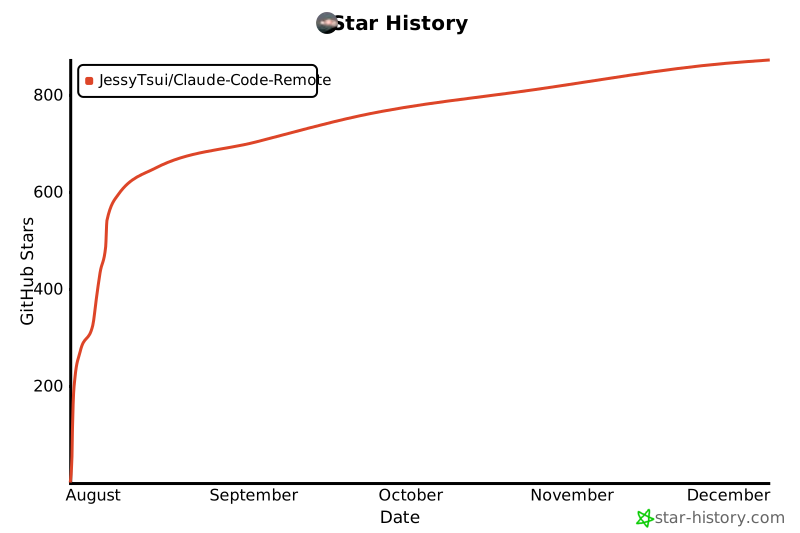](https://star-history.com/#JessyTsui/Claude-Code-Remote& Date)
2025-07-27 22:59:51 +08:00
⭐ **Star this repo** if it helps you code more efficiently!
2025-07-27 02:22:12 +08:00
2025-07-27 22:59:51 +08:00
> 💡 **Tip**: Share your remote coding setup on Twitter and tag [@Jiaxi_Cui](https://x.com/Jiaxi_Cui) - we love seeing how developers use Claude Code Remote!
